Exploring the Ambient Side of Music.
This guide explores ambient music production, lo-fi beatmaking and acoustic texture in Ableton Live, using examples from Liveschool artists and simple production techniques you can try yourself.
BRUX just dropped Halcyon Phase – a full ambient album from one of Australia’s most respected club producers. It’s a gorgeous record, and one that got us thinking about the quieter corners of music: the tracks you reach for when the party’s over, the sun’s coming up, or you just need to breathe. From jazz-inflected lofi beats to acoustic intimacy to full-on beatless soundscapes, the world of chill music is wider – and more interesting – than it often gets credit for.
And as it turns out, a lot of it is being made by people we know.
In this blog post we highlight some defining production moves for making Acoustic, Lo-fi, or Ambient music – and showcase some of our amazing graduates and the “quieter” side of the music they’re making.
Liveschool Chill Playlist
Ambient, Lo-fi and Acoustic Music Production Explained
Before we dive in, it’s worth defining some of these sub-genres. There are actually a few distinct flavours worth naming:
Acoustic and singer-songwriter chill is performed, organic, intimate. The quiet comes from restraint and space in the arrangement rather than production technique. Think a voice, a piano, and a room.
Lofi beats – and it’s worth acknowledging how far this term has drifted from its origins. Lo-fi once meant deliberately low fidelity: broken gear, four-track tape hiss, a conscious rejection of polished production. Today the word mostly describes jazz and soul-inflected downtempo hip-hop beats – warm, sample-heavy, designed for study playlists and late-night headphone sessions. The aesthetic references tape warmth and vinyl crackle, but the production is often anything but lo-fi. It’s its own language now.
Ambient and soundscape is the textural, atmospheric end of the spectrum. Often beatless or with heavily recessed rhythm, rooted in the lineage of Brian Eno’s Music for Airports, the washed-out walls of shoegaze, and the kind of deep listening that rewards attention to detail. This is music that’s shaped more by space, tone and movement than by melody or groove.
Most interesting chill music lives somewhere between these lanes – or moves freely across them. What ties it all together isn’t genre. It’s energy and intention: music that prioritises space, texture and mood over dancefloor momentum.
Production techniques and song examples
Each Ableton tip below is labelled by level, from beginner through to more advanced techniques, so you can jump in at the right depth for your experience.
Jump to subgenre: Acoustic | Lo-fi | Ambient
Acoustic / Singer-Songwriter
Acoustic chill is about restraint. These are tracks built around real instruments and space – no production tricks, just arrangement and performance doing the heavy lifting.
Angie McMahon x Fred again.. – light dark light
Liveschool alumni Angie McMahon is best known for raw, emotionally powerful singer-songwriter records – her album Light, Dark, Light Again landed at #3 on Rolling Stone AU/NZ’s Best Australian Albums list and won the ARIA Award for Best Independent Release. So when Fred again.. – who once called her “one of my favourite singers ever” – reinterpreted her closing track “Making It Through” into light dark light, the result was something new entirely. Fred built the production around a phone recording from the crowd at one of McMahon’s London shows, folding live energy into a delicate, atmospheric electronic piece. McMahon’s mantra-like delivery – the idea that life swings between lightness and darkness – lands differently wrapped in Fred’s production.
Ableton Tip (beginner): Finding Acoustic Sounds in the Browser
If you want to recreate or complement an acoustic aesthetic in Ableton, the Browser is your starting point. Under the Instruments / Sounds tab, filter by Acoustic to find presets built around organic, natural-sounding timbres.
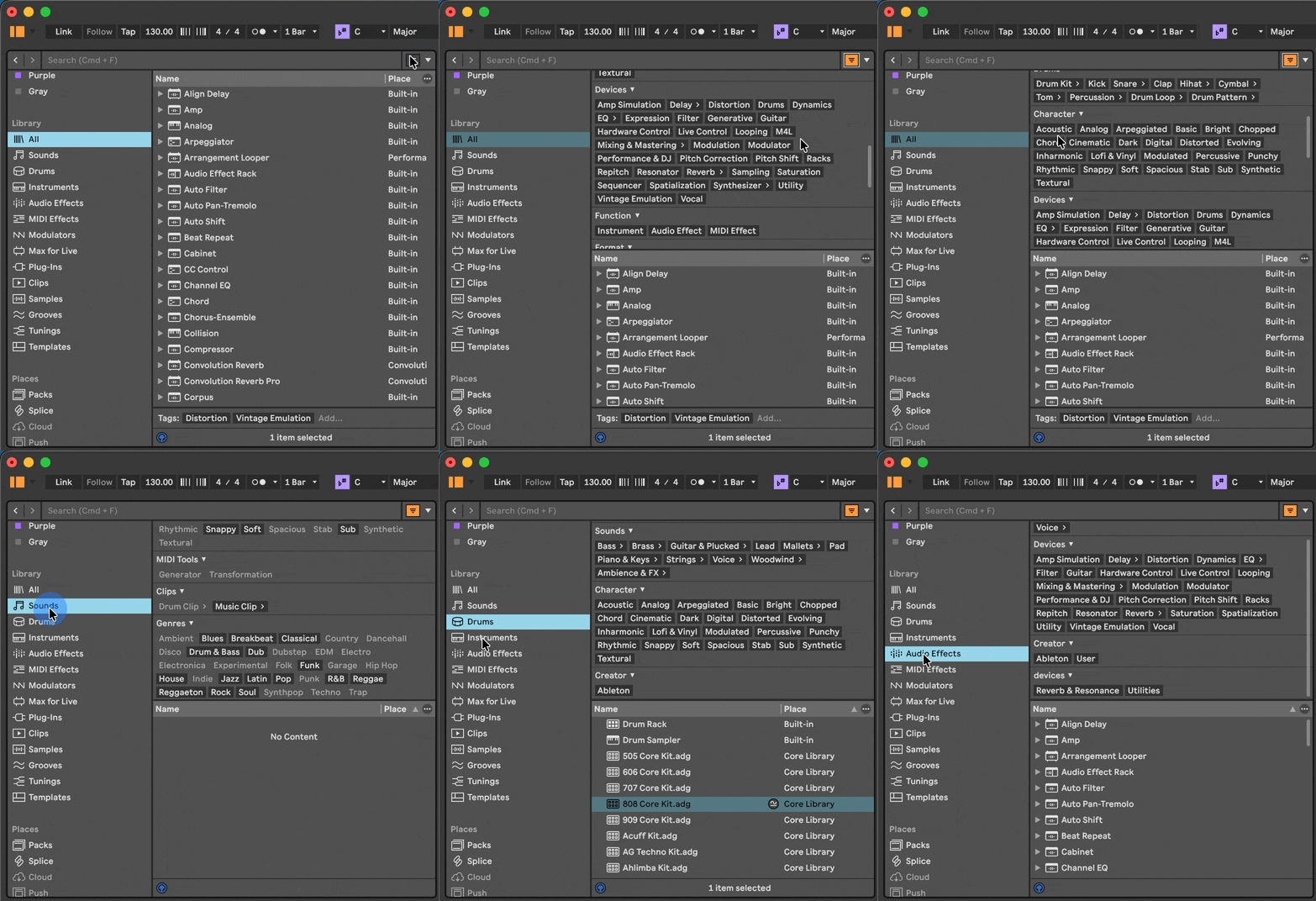
Then head to the Audio Effects tab and reach for a Room reverb – it’s the difference between a sound that floats in empty digital space and one that feels like it exists somewhere real.
Once you’ve got a room sound that feels right, the next step is finding ways to push it further. Acoustic music lives and dies by the sense of physical space – and that’s something you can actually capture and recreate.
Sir Jude – Trophy Wife
Sir Jude has been building serious momentum – Glastonbury and SXSW slots, a move to London, and a growing catalogue of dark, cinematic electronic pop balanced with delicate acoustic meditations. Which is exactly what makes her Trophy Wife Tapes EP so striking. When she lets the atmosphere breathe, you hear a different kind of depth – chill music with a cinematic edge.
Esther Rose – Mango Skin
Esther Rose’s Mango Skin brings a gentle, organic warmth. It feels handmade in the best possible way – intimate, unpolished in all the right places, and quietly beautiful.
Ableton Tip (intermediate): Loading a Room Sample into Hybrid Reverb
For a more advanced take on acoustic space, try dropping an actual “room recording” into the Convolution section of Ableton’s Hybrid Reverb. Instead of a synthetic algorithm, you’re using the acoustic signature of a real space – a living room, a stairwell, a church.
By “room recording”, I mean: go into a quiet room and record a single loud “impulse” (hand clap, baloon pop, etc). Record it cleanly, trim it, then drop that file into Hybrid Reverb’s convolution section:
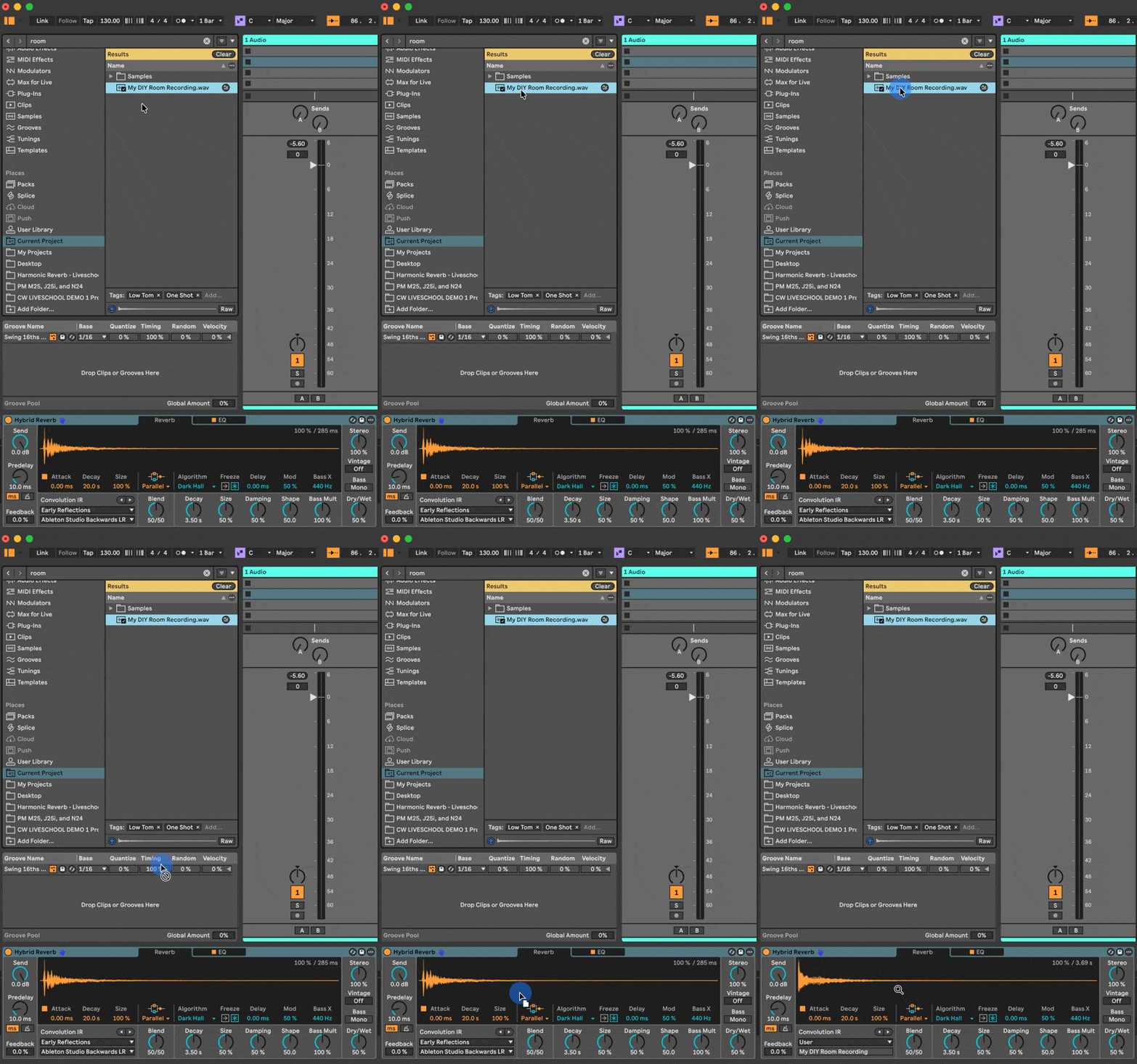
Recording your own spaces gives you a reverb that’s genuinely unique. Combine it with the algorithmic side of Hybrid Reverb for something that’s part real, part processed – and entirely your own.
That said, you don’t need to make “realistic” room sounds – dropping any audio file onto Hybrid Reverb will have interesting results.
Banksia – no.1
Banksia showcases the acoustic side of his eclectic range, stepping away from his usually club-oriented productions into beautifully DIY-recorded piano.
Lofi Beats
Lo-fi beats are built on imperfection. The drum patterns are deliberately loose, the samples are warm and dusty, and the whole thing feels like music being played through a room rather than produced in one.
bbyJIWA
Liveschool alumni bbyJIWA blends jazz and soul samples with downtempo beats, but what makes her sound distinctive is the range. One track might sit in classic lofi hip-hop territory with warm chords and dusty drums, while the next dips into jungle-influenced rhythms or layers in ambient, atmospheric vocals. It’s chill music with real depth.
Ableton Tip (beginner): Building Lo-fi Texture in the Browser
The lo-fi aesthetic starts with the right raw materials. In the Browser, search for Drum Clips to find pre-made patterns with that authentic, slightly imperfect feel – the subtle timing variations are part of the charm.
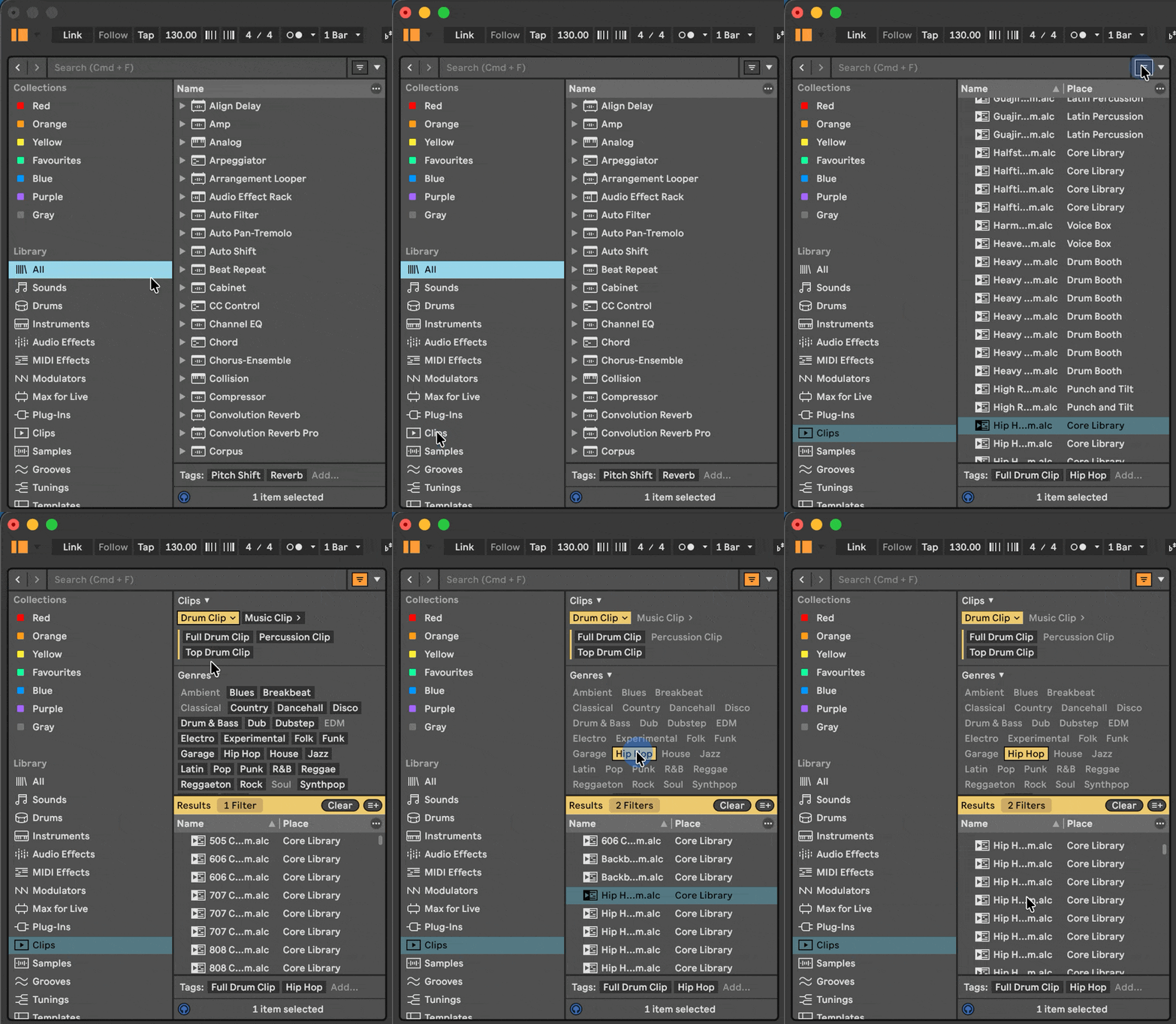
That gif shows browsing the Clips folder to find MIDI Drum loops, and the same works in the Samples Folder to find Audio Drum loops.
From there, layer in Vinyl Crackle for surface noise and warmth, and run your signal through Dynamic Tube for harmonic saturation. That slight grit is what separates lo-fi from just “quiet music.”
Beyond the textures, lo-fi production is also deeply rooted in harmony. The genre has a strong jazz influence, and understanding some of those chord voicings opens up a lot.
Wyllem – Here, Now
Wyllem’s Here, Now leans fully into lofi territory – warm, textured, and unhurried. If you’re someone who reaches for instrumental beats while working, studying or decompressing, this is one to add to the rotation.
Ableton Tip (intermediate): Jazz Harmony with the Chord Device
Lo-fi’s characteristic wistfulness comes largely from its harmony – specifically, the jazz-influenced chord voicings borrowed from soul and hip-hop.
The Chord MIDI device is a quick way to experiment with jazz chords. Set it to voice a minor 9 then using the settings in the video below, then play a single note to get that searching, bittersweet quality that defines the genre (expand the video for full detail):
For even more emotional range, set the Chord device to “Scale Aware” mode (the little [♭♯] button turns purple). This lets you build rich moody chords on any single note while always staying in-key (expand the video for full detail):
Then, add some vinyl texture, and a dusty drum loop and you’re a long way there.
heartholder – Rhode Rage
Speaking of the jazzier side of life…
Eora/Sydney-based producer and Liveschool alumni heartholder sits at the intersection of jazz and electronic music. His productions layer live saxophone and strings over darker synth basses and chopped jazz drums – sometimes threading in jungle breaks. His approach of building each track around two opposing elements – one jazz-inspired, one electronic – creates a compelling tension. Not quite lofi, not quite jazz – 100% sublime.
Setwun – Honesty
And for an even deeper jazz cut, we can’t NOT mention the absolute master, Setwun:
Ambient / Atmospheric
Ambient production is about setting a mood and then getting out of its way. The music in this section ranges from cinematic and intense to genuinely beatless and contemplative – but all of it prioritises atmosphere over momentum.
Big Ever – Dab Heretic
Big Ever moves across genres freely, but Dab Heretic – released on the legendary !K7 Records – lands squarely in atmospheric territory. A slow-burn piece of electronica in the sweet spot between ambient soundscape and headphone listening. Textural, considered, and quietly confident.
Misolt – Cicada
One for the deep diggers. Misolt’s Cicada is a quiet gem – the kind of track you stumble across and immediately want to share. Understated, atmospheric, and rewards repeated listens. Sometimes the best finds are the ones nobody’s talking about yet.
Ableton Tip (beginner): Exploring the Browser for Ambient Sounds
The Browser is a good place to start building ambient texture. In the Sound tab, filter by Pads or Textures to find presets designed for atmosphere rather than melody.
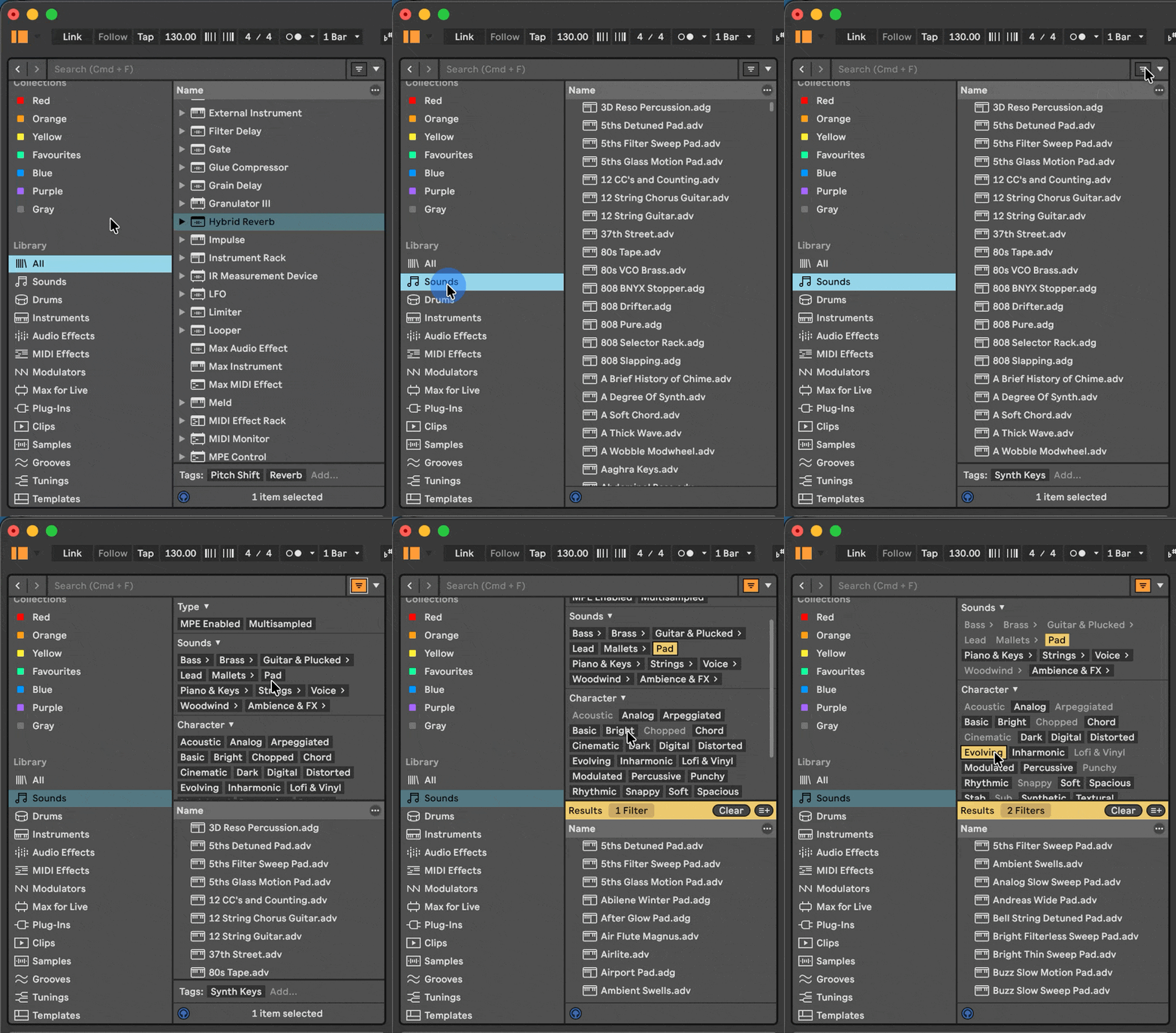
Under Audio Effects, look for long reverbs and delays that push sounds into the distance – these create the sense of space that ambient music depends on. Spend some time auditioning presets and you’ll quickly develop a feel for which sounds have the right kind of stillness.
With the mood established, the deeper challenge in ambient production is keeping things evolving. Static pads get dull fast – the best ambient music has subtle, continuous movement built into it from the ground up.
BRUX – I wish I could talk in Technicolour
An ambient album in the classic sense – “Halcyon Phase” is a full length mind-bath by BRUX. A stark contrast to the club productions she’s known and loved for, and we’re 100% here for it.
Tayla – A Spark
Check out our interview with the amazing Tayla here
Ableton Tip (intermediate): Dialling in an Ambient Synth Patch
Ableton’s built-in synths – particularly Wavetable or Analog – are excellent for building ambient pads from scratch. The key settings to focus on:
Slow attack – let the sound ease in rather than hit. Ambient music rarely announces itself.
Long release – give notes room to breathe and fade naturally.
Low pass filter – roll off the high end to taste. Brightness is the enemy of atmosphere.
Long reverbs – push the sound into space on the output.
(expand the video for full detail)
From there, layer in modulation – use the Matrix section of Wavetable to add slowly undulating LFO’s to create slow organic movement. The goal is a sound that feels like it’s always slightly changing – ambient music should never feel completely static. Then add in audio effects like Reverb, Echo, Chorus, Phaser for more spaciousness and depth.
Ableton Tip (intermediate): Building an Ambient Soundscape with Harmonic Reverb

In this walkthrough, Alex (SUB-human) makes an example ambient soundscape from scratch using our Harmonic Reverb pack and Ableton’s Granulator III.
Step 1 — Play some basic piano chords, then add the Harmonic Reverb (Standard preset). The harmonic reverb adds extra harmonies and depth. Adjust the reverb to taste:
Step 2 — Right-click the recorded clip and choose “Bounce In Place”. This combines the recording and the Harmonic Reverb effect into one clip.
Step 3 — On a MIDI track, drop that new clip into a Granulator III and experiment with the settings and add more effects (expand the video for full detail):
The effects used in the example above:
- Vocoder set to “noise” mode. This adds a rough texture reminiscent of heavy rain or a very scratchy vinyl record.
- Harmonic Reverb (Weighty preset). This adds even more harmony, texture and depth – making the chords even more epic.
- Multiband Dynamics (OTT preset). This brings up the quiet detail making everything sound huge.
Ready to try it?
- Our Harmonic Reverb rack transforms ordinary sounds into lush, chord-like textures that stay in key with your track – using just native Ableton devices. No third-party plugins needed.
- Ableton’s Granulator III is a sampler instrument that uses granular synthesis (takes a normal sound, slices it into microscopic bits, then lets you smear, stretch, and blur those bits into something completely new). It is included free with Live 12 Suite but doesn’t come pre-installed. If you have Live 12 suite, download it here
The Ambient Toolkit: More Ableton Features Worth Exploring
If the tutorial got you curious, here are some more Ableton tools that are perfect for ambient, textural and soundscape production.
Scale Awareness Across Devices
One of the most powerful things to happen in recent Live updates is the expansion of scale awareness across audio effects. Set your project key, and a growing number of devices will snap to it – meaning your textures, reverbs and resonances stay harmonically coherent without you having to think about it.
- Resonators gained scale awareness in Live 12.2, which is exactly what powers our Harmonic Reverb rack. Turn on the purple “scale aware” button and the resonant frequencies follow your song’s key – instant tonal reverbs.
- Spectral Resonator also supports scale awareness and tuning systems. Feed it audio and it’ll create pitched, harmonically relevant resonances from any source material – drums, vocals, field recordings, anything.
- Meld’s filters are scale-aware too, with plate and membrane resonators that track scale pitch. Combined with its dual macro oscillators and extensive modulation matrix, Meld is a deep well for creating evolving, textural sounds that stay musical.
And beyond audio effects, the Arpeggiator, Scale MIDI effect, Random, Chord and Auto Shift all respond to scale awareness – meaning your generative MIDI experiments stay in key without manual intervention. For ambient production, where you’re often setting up systems and letting them evolve, this is huge.
Inspired by Nature
If you have Live Suite, the Inspired by Nature pack (created in collaboration with Dillon Bastan) is basically an ambient playground included in Live Suite as a separate free download. These Max for Live devices use simulations of natural forces – gravity, magnetism, friction, fractals – to create generative, evolving sounds.
- Tree Tone is a standout for ambient work. It grows fractal tree-branch structures where each branch is a resonator with its own frequency, decay and amplitude. Use the internal noise generator to excite the resonators and you get ethereal plucked tones and resonant ambiences. You can also feed it your own audio as a filter bank, or run the output back into itself for resonant feedback.
- Emit is a visual granular synth where particles shoot across a spectrogram, representing grains of a sample being played. Vertical movements control filtering and panning. Add walls for particles to bounce off, friction to slow them down – the results range from delicate shimmer to dense, evolving textures.
- Vector Grain and Vector Delay round out the toolkit. Vector Grain is a granular looper with particle-based modulation of pitch, position and grain size. Vector Delay is a multitap delay where each particle represents a different delay line – great for creating pitch-shifting, detuning or reverse delay effects that feel alive.
New features in Ableton Live
Since Live 12 was released, Ableton have been on a hot streak releasing free updates with new capabilities:
- Live 12.4’s new features included the updated Chorus-Ensemble device – an effect featured often in the Acoustic, Lo-fi and Ambient genres, for its ability to add richness and depth to sounds.
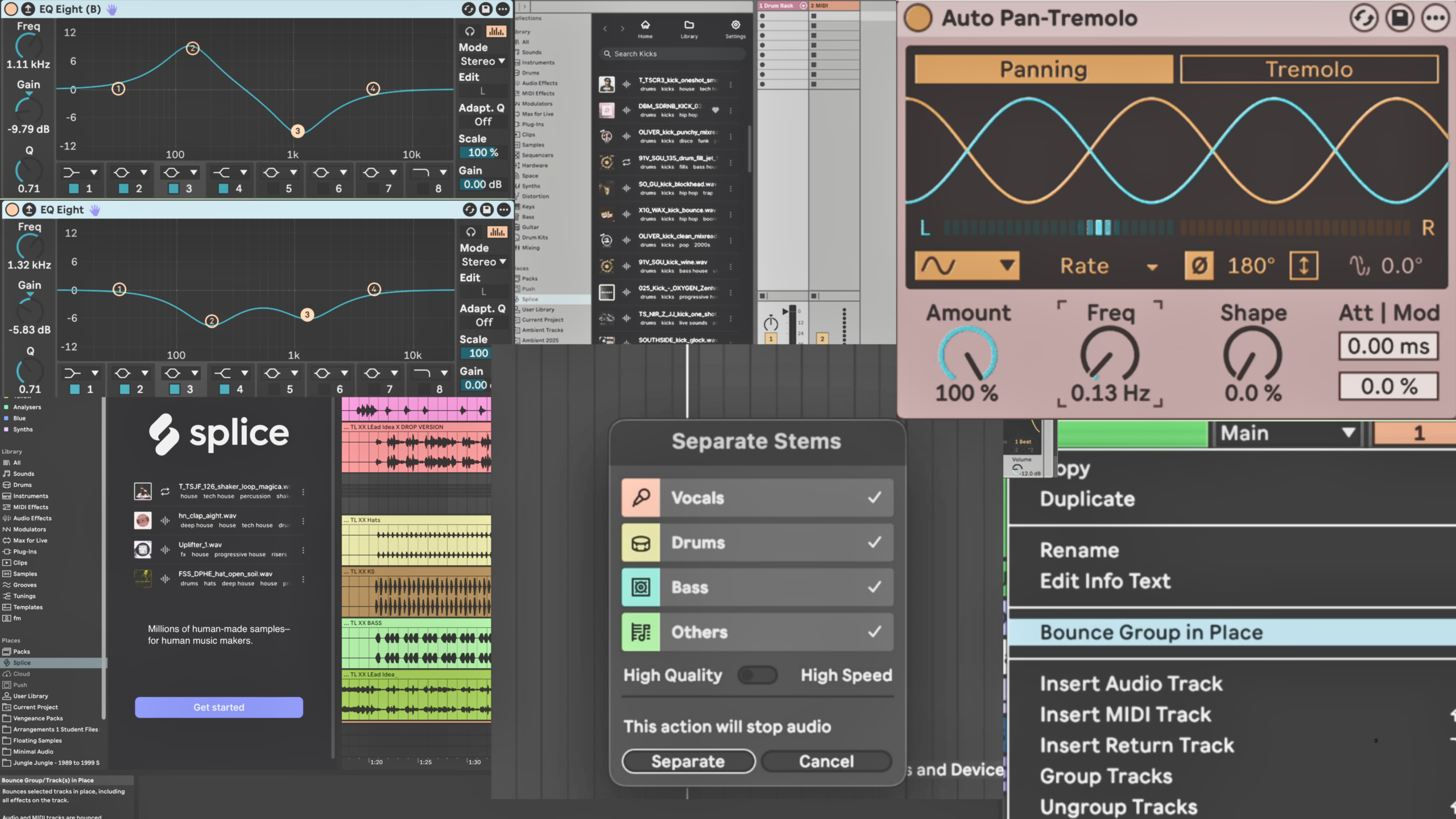
- Live 12.3’s new features included the updated Erosion device for adding dusty lo-fi texture. plus the reimagined Auto Pan-Tremolo for adding spatial movement and subtle stereo drift to ambient textures. A simple way to make static pads feel like they’re breathing.
- Live 12.2’s new features included the incredibly useful bounce in place feature that turns complex tracks of sound, audio effects and devices into easy-to-handle audio clips.
Not Just for Dance Music
Here’s something we’re proud of: all of the artists showcased in this blog post came through Liveschool – all part of the community, all making wildly different music. Which is a good reminder that learning Ableton and developing your production chops isn’t about locking yourself into one genre. The same tools, techniques and training that help you build a dancefloor weapon are the same ones that let you craft a delicate ambient soundscape, a jazz-inflected beat tape, or a cinematic vocal piece.
The skills are transferable. The only thing that changes is what you point them at.
The artists in this piece learned their craft across every genre imaginable – and so can you. Explore Liveschool’s courses and find out how production training translates into whatever music you want to make.